


Join Early Access
Be among the first to turn UI screenshots into ready-to-use HubSpot modules. Build faster, skip repetitive work, and help shape the future of AI-powered development.
Apply for Beta
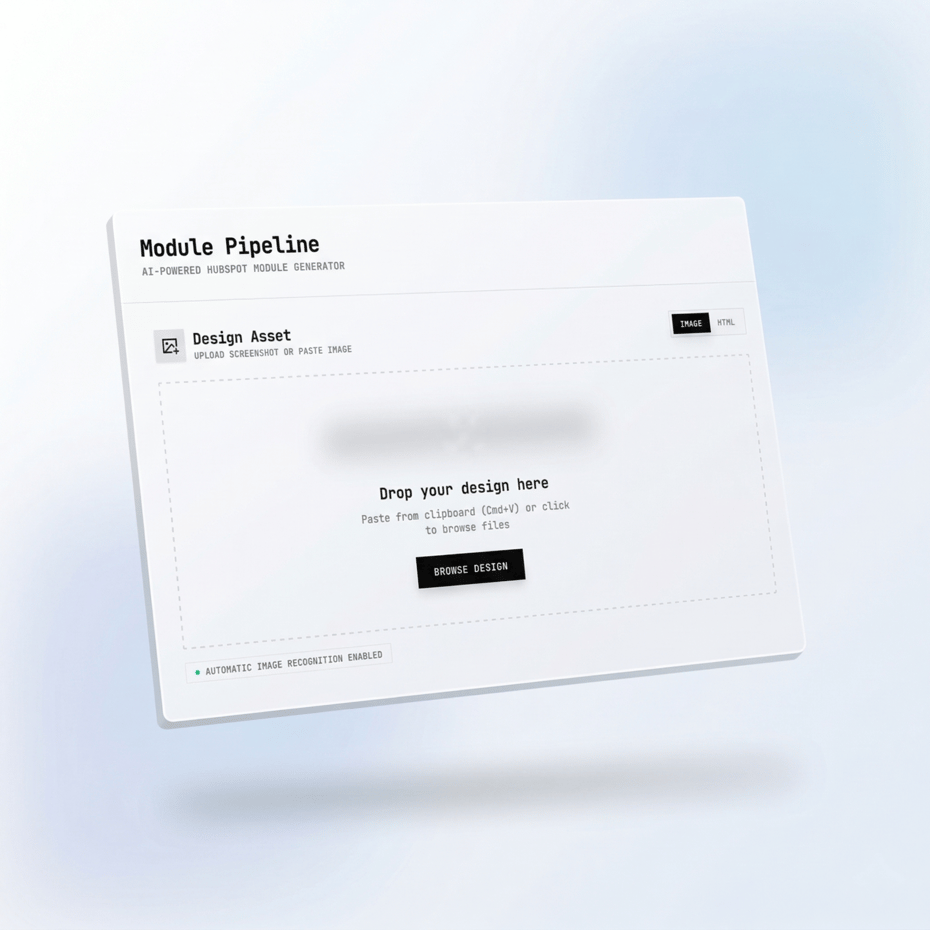
No installation or complex configuration needed. Just upload your UI screenshot and let AI generate your HubSpot module instantly.
We’re onboarding a limited number of early users to ensure quality and gather feedback. Join early to secure your spot.
Rapid is currently in development and will be available soon. Early users will get priority access and exclusive benefits.
Join Rapid Early Access ⚡
Get early access and help shape the product.
By providing your email, you agree to receive marketing emails and accept our Privacy Policy and Terms.
From Screenshot to Module
What Rapid can do for you
UI to Module
Smart Field Generation
HubL + Markup Ready
Ready to Deploy
Turn
to HubSpot
Modules within Minutes⚡
Be an early Rapid user
Get early access
Be one of the first to turn UI screenshots into ready-to-use HubSpot modules.
Early users will get priority access, direct influence on product direction, and exclusive early adopter benefits.
Let’s build the future of HubSpot development together.

Upload Screenshot
Capture your UI and upload it to get started instantly.

Analyze UI
AI analyzes layout, components, and structure automatically.

Generate HubSpot Module
Create fields, HubL, and styling — ready to use.

Deploy to HubSpot
Save and use the module directly in your HubSpot portal.
Frequently asked Questions
Rapid is an AI-powered development tool built specifically for HubSpot CMS. It takes any UI screenshot you upload and converts it into a fully functional HubSpot custom module — complete with HTML, fields.json, and HubL variable bindings.
The idea is simple. Instead of spending 2-4 hours manually writing module code, fields, and bindings for every section of a website, you upload a screenshot and Rapid does the heavy lifting in under 60 seconds. The generated module is production-ready, follows HubSpot development best practices, and can be deployed directly to your portal with one click.
Rapid is designed for HubSpot developers, agencies, freelancers, and marketing teams who want to build faster without sacrificing code quality. Whether you're building a hero section, a feature grid, a testimonial block, or a pricing table — Rapid handles it.
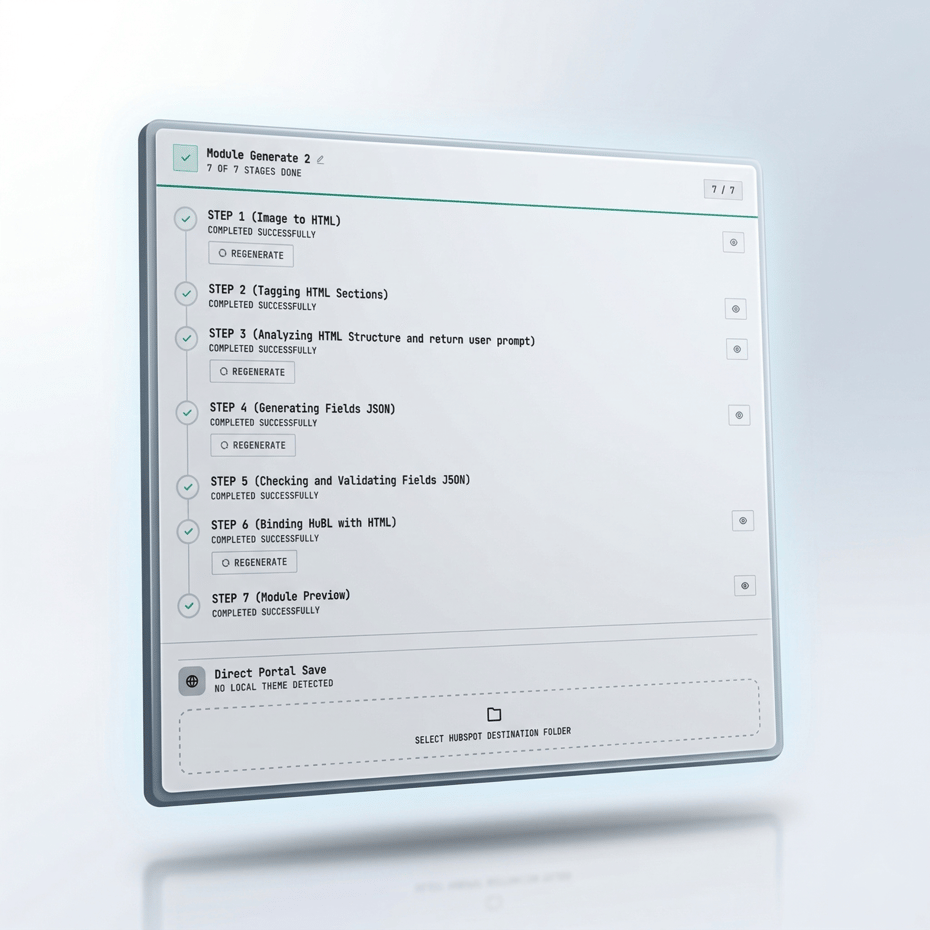
Rapid follows a three-step workflow that takes you from a design screenshot to a deployed HubSpot module in under a minute.
Step 1 — Upload. You upload any UI screenshot. This can be a Dribbble shot, a Figma export, a client mockup PDF, a Behance design, a website screenshot, or even a photo of a hand-drawn wireframe on paper. Rapid's vision AI analyzes every element in the image — headings, text blocks, images, buttons, links, cards, navigation items, icons, and more.
Step 2 — Generate. Based on the analysis, Rapid automatically generates a complete custom module. This includes clean semantic HTML with Tailwind CSS utility classes, a properly structured fields.json with correct field types (text, image, link, boolean, choice, color, number), logical field grouping, HubL bindings for every dynamic element, section settings with ID, custom class, and visibility toggle, and show-if conditions where appropriate.
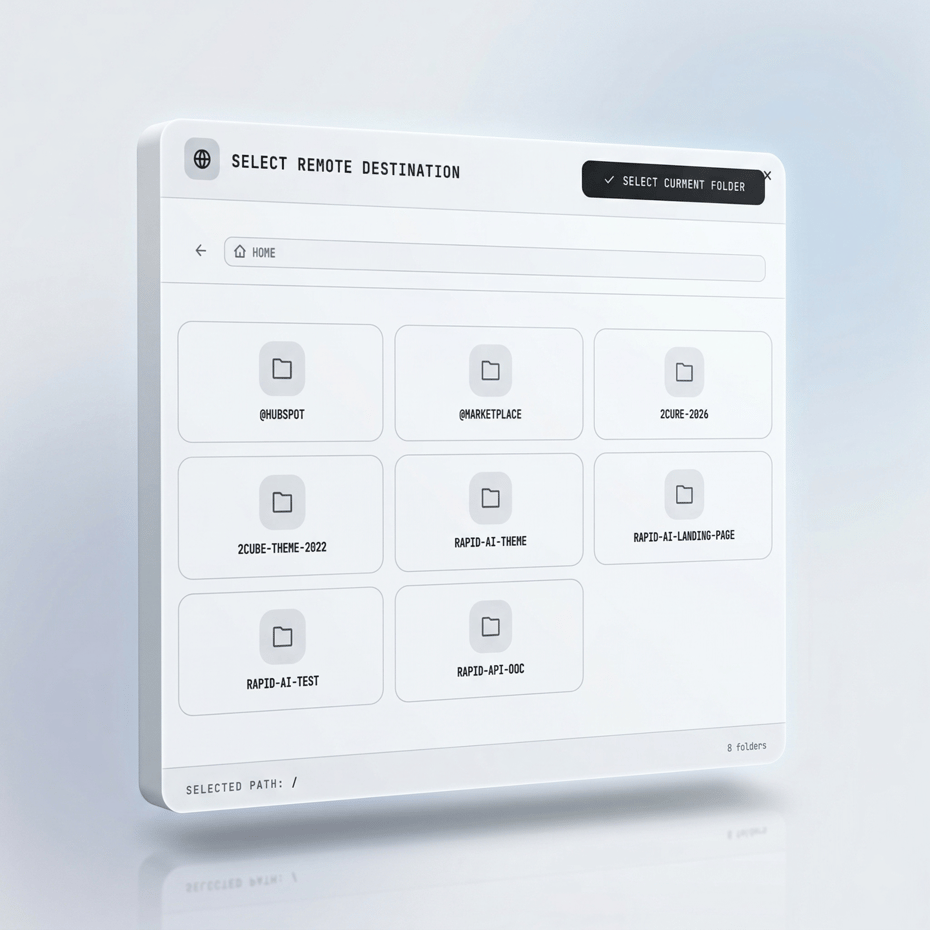
Step 3 — Deploy. Once you review the generated code and make any adjustments you want, click deploy. The module goes directly into your HubSpot theme — ready for content editors to start using immediately in the page editor.
Practically anything that shows a user interface design. Rapid's AI is trained to understand UI patterns regardless of where the image comes from.
Here are some examples of what works: screenshots from Dribbble or Behance for inspiration-based builds, exported frames from Figma or Adobe XD, screenshots of live websites you want to recreate as HubSpot modules, client mockups sent as PNG, JPG, or PDF files, wireframes from tools like Balsamiq or Whimsical, and even photos of hand-drawn sketches on paper or whiteboards.
The image quality doesn't need to be perfect, but clearer screenshots produce more accurate results. We recommend using images that are at least 1200px wide for best results.
No. This is one of the biggest differences between Rapid and other tools in the market. Tools like transjt.ai require you to have Figma designs with specific component tagging, auto-layout configuration, and a Figma plugin installed before you can generate anything. That's a steep learning curve and a significant barrier if your team doesn't use Figma.
Rapid removes that barrier entirely. You don't need Figma, Sketch, Adobe XD, or any design tool at all. If you have a screenshot — from literally any source — you can generate a HubSpot module. This means your client sends you a PDF mockup? Upload it. You found a design on Dribbble you want to replicate? Screenshot and upload. You sketched a section on a whiteboard during a meeting? Take a photo and upload. No design tools required.
No coding knowledge is required to generate and deploy modules. The entire workflow — upload, generate, deploy — is designed to be used without writing a single line of code.
That said, if you're a developer and want to fine-tune the generated output, Rapid gives you full access to the HTML, fields.json, and HubL code. You can edit anything before or after deployment. For agencies where a developer reviews code before it goes live, this is the ideal workflow — Rapid generates 90-95% of the module, and the developer handles the final polish.
When you upload a screenshot, Rapid generates a complete HubSpot custom module with all four required files:
module.html — Clean, semantic HTML using Tailwind CSS utility classes for styling. HubL tags are used for all dynamic content with proper whitespace control. Every element is conditionally rendered so empty fields don't produce broken HTML.
fields.json — A fully structured field definition with proper field types for every element Rapid detects. Text fields for headings and paragraphs, image fields with responsive attributes, link fields for buttons with new tab and nofollow options, boolean fields for toggles, choice fields for dropdowns, and color fields where appropriate. Fields are logically grouped — Content, Image, Button, Section Settings — so content editors see a clean, organized interface.
module.css — This file is intentionally kept minimal or empty. Rapid follows the best practice of using Tailwind utility classes in the HTML instead of writing module-specific CSS. Custom CSS is only included when an animation or interaction genuinely requires it.
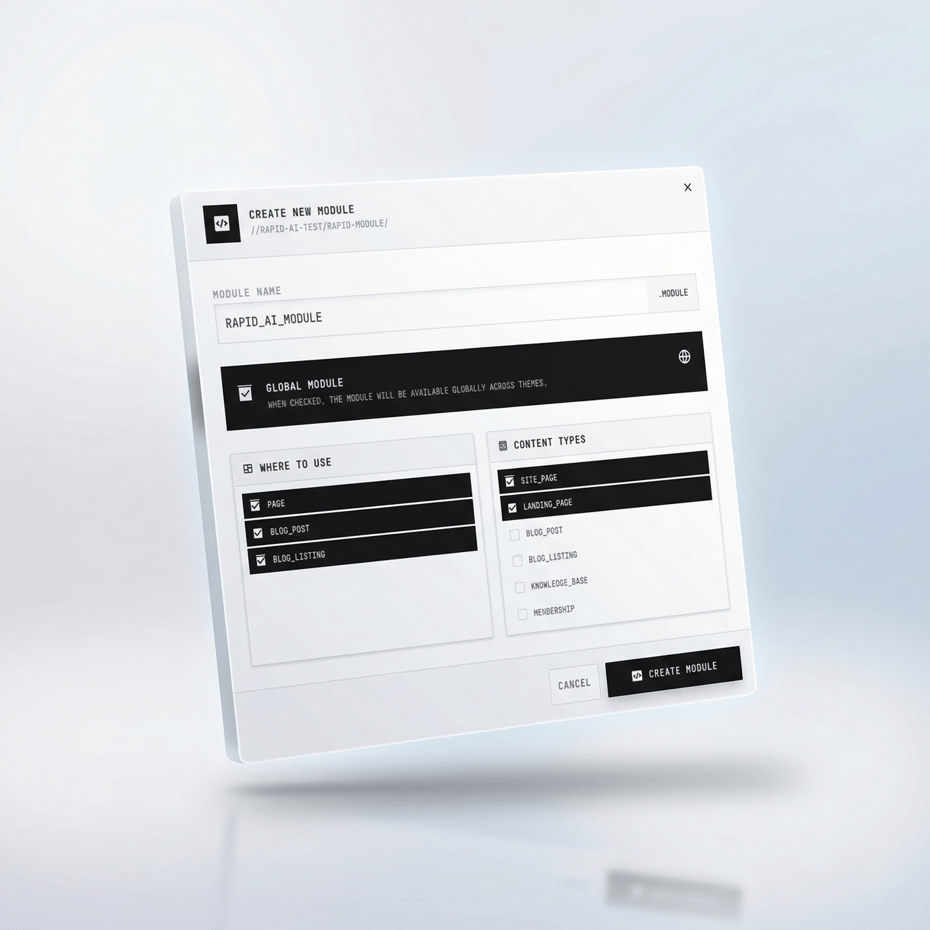
meta.json — Proper module configuration including the label, help text, allowed template types, and content categories.
Rapid correctly identifies and converts a wide range of UI elements — headings, paragraphs, images, buttons, links, navigation menus, cards, icon grids, testimonial blocks, form sections, and more. It understands the visual hierarchy of a design and maps elements to the appropriate HubSpot field types.
Most users report 90-95% accuracy on the first generation. The remaining 5-10% typically involves minor adjustments like tweaking spacing values, adjusting a field label, or reordering a field group. Even with these adjustments, the total time from screenshot to deployed module is measured in minutes, not hours.
Accuracy improves with clearer, higher-resolution screenshots. Screenshots with distinct visual separation between sections, consistent spacing, and readable text produce the best results.
Yes. When you connect your HubSpot portal to Rapid, it fetches your active theme and its structure. Modules are deployed directly into your theme's modules folder, following the same directory structure and naming conventions your theme already uses.
Rapid does not overwrite existing files. Each generated module is created as a new module within your theme. Your existing templates, modules, CSS, and JavaScript remain completely untouched.
Yes, and this is a key part of the workflow. After Rapid generates a module, you see the full code — HTML, fields.json, and HubL — in an editor view. You can modify anything you want before hitting deploy.
This is especially useful for developers who want to add custom logic, change field defaults, adjust class names, or integrate the module with theme-specific macros. For non-developers, the generated code is typically ready to deploy as-is.
You can also deploy first and make changes later in HubSpot's Design Manager. The module behaves like any other custom module in your portal — fully editable, fully yours.
Under 60 seconds in most cases. The time depends on the complexity of the screenshot — a simple hero section generates in about 20-30 seconds, while a complex multi-element section with cards, buttons, and images might take up to a minute.
To put this in perspective, building the same module manually — writing fields.json by hand, creating the HTML structure, adding HubL bindings, testing field references, and debugging — typically takes 2-4 hours for a mid-complexity module. Rapid reduces that to under a minute.
You need a HubSpot account that supports custom coded modules. This includes CMS Hub Professional, CMS Hub Enterprise, Content Hub Professional, and Content Hub Enterprise. If you can create custom modules in your HubSpot Design Manager today, Rapid will work with your portal.
Rapid connects to your portal using HubSpot's official OAuth authentication. You authorize access through HubSpot's standard permission flow — we never ask for or store your HubSpot password.
Security is a core priority. Here's how we handle your data:
Screenshots are processed in real-time by our AI engine and are not stored permanently after the module generation is complete. They are used solely for the purpose of generating your module and are deleted from our servers after processing.
HubSpot connection uses official OAuth 2.0 authentication. You authorize Rapid through HubSpot's standard permission screen. We receive an access token to interact with your portal's Design Manager — we never see, store, or have access to your HubSpot password.
All communication between your browser, our servers, and HubSpot's API is encrypted using TLS (HTTPS). Data at rest is encrypted using industry-standard AES-256 encryption.
The core difference is the input. transjt.ai requires Figma designs with a specific workflow — you need to install their Figma plugin, tag components correctly, set up auto-layout, and follow their design conventions before generating anything. This creates a high barrier to entry, especially for teams that don't use Figma or don't have a designer on staff.
Rapid takes a fundamentally different approach. You upload any screenshot from any source and get a complete module. No Figma. No plugins. No component tagging. No auto-layout setup. The learning curve is essentially zero — if you can drag and drop an image file, you can use Rapid.
There are other differences too. transjt.ai focuses on generating full themes, while Rapid focuses on individual modules first (with page and theme generation coming soon). Rapid follows specific HubSpot development best practices like Tailwind CSS utility classes, HubL whitespace control, section settings macros, and SEO-optimized heading tags — all built into every generated module.
Currently, Rapid generates individual custom modules — one section at a time. This is our Phase 1 product, and it's what's available today.
Phase 2 — Full Page Generation is actively in development. This will allow you to upload a complete page screenshot and Rapid will break it down into multiple section modules automatically. Upload a homepage screenshot with a hero, features section, testimonials, and CTA — and get four separate, properly structured modules ready to deploy.
Phase 3 — Complete Theme Generation is on our roadmap. The vision is to upload screenshots of 3-5 pages (homepage, about, services, contact, blog) and Rapid will generate an entire HubSpot theme with all modules, templates, and global styles. This is our long-term goal, and we're building toward it step by step.
Sign up at tryrapid.ai to get notified when new phases launch.
Rapid offers three levels of module generation, each designed for different use cases:
Basic Level generates a clean module with flat fields, no defaults, and minimal configuration. This is ideal for quick prototyping when you just need a starting structure and plan to customize everything manually.
Medium Level adds smart defaults for short content (headings, button text), logical field grouping, and help text for every field. This is the sweet spot for most day-to-day module development — you get a well-organized module that content editors can start using immediately.
Advanced Level includes everything in Medium plus section settings group (ID, custom class, visibility toggle), show-if conditions for conditional field display, full default values for all content fields, and comprehensive grouping. This is the production-ready level — the generated module follows every best practice covered in professional HubSpot development.
The number of connected portals depends on your plan. The free tier allows one HubSpot portal connection. Paid plans support multiple portal connections, which is essential for agencies managing several client accounts from a single Rapid dashboard.
Switching between portals is seamless. You select the target portal before deploying a module, and Rapid fetches that portal's theme structure so the module is deployed to the right location every time.
Yes, and this is something we take seriously. Every module generated by Rapid follows professional-grade HubSpot development standards. Here's what that means in practice:
Field structure — Fields are grouped logically (Content, Image, Button, Section Settings) so the editor interface is clean and navigable. Every field has a descriptive label and help text. Naming conventions are specific and clear ("Hero Background Image" not just "Image").
HubL quality — All HubL tags use the whitespace control syntax, which strips unnecessary blank lines from the rendered HTML. This makes your page source cleaner and your HTML file size smaller. Every field output is conditionally rendered — if a field is empty, nothing renders. No empty divs, no broken layouts.
CSS approach — Rapid uses Tailwind CSS utility classes directly in the HTML instead of writing module-specific CSS. This means one lightweight, purged CSS file for your entire theme instead of 50 separate module.css files. The result is faster page loads, consistent styling, and easier maintenance.
SEO compliance — Heading tags are dynamic (controlled by a choice field), so content editors can manage the H1/H2/H3 hierarchy per page. Image fields output proper alt text, width, height, and loading="lazy" attributes without overriding HubSpot's built-in image handling. Color contrast follows WCAG AA standards when using Tailwind's default palette.
JavaScript policy — Rapid does not add module.js unless the module genuinely requires interactivity (like an accordion or carousel). Static content modules ship with zero JavaScript.
Absolutely. Modules generated by Rapid are fully yours. There are no licensing restrictions, no watermarks, and no attribution requirements on paid plans. You can deploy them to any client portal, include them in any theme you're building, and charge your clients for the work however you see fit.
Many agencies use Rapid to dramatically speed up their HubSpot website development process. Instead of spending days building custom modules for a client project, they generate the modules in minutes and spend their time on strategy, content, and fine-tuning — the work that actually adds value.
No AI tool produces perfect output 100% of the time, and we're transparent about that. Rapid generates a strong foundation — typically 90-95% of what you need — and gives you full control to adjust the rest.
Common adjustments include reordering fields within a group, tweaking a default value, adjusting a Tailwind class for spacing or color, adding an extra field that wasn't visible in the screenshot, or removing a field that isn't needed for your specific use case.
These adjustments typically take 2-5 minutes. Compare that to the 2-4 hours it takes to build the same module from scratch, and the value is clear — even an imperfect generation saves you massive amounts of time. As our AI improves with more usage and feedback, the accuracy gap continues to shrink.
Getting started takes about 30 seconds. Visit tryrapid.ai and sign up for a free account. No credit card is required.
Once you're in, connect your HubSpot portal through the secure OAuth flow, select your theme, and upload your first screenshot. Your first 5 modules are completely free — enough to experience the full workflow and see how Rapid fits into your development process.
If you have questions or need help getting started, reach out to us on LinkedIn or Twitter/X. We're building this for the HubSpot developer community, and we'd love to hear from you.